客户程序添加方法
一 重要文件简介
1.1 xburst/init.c
void c_main(void *data)
{
    zero = (void *)&_start;

    arch_init_cpu();

    arch_enable_fpu();

#ifdef CONFIG_UART_CONSOLE
    uart_console_init();
#endif

#ifdef CONFIG_SHOW_COMPILE_TIME
    show_compile_time();
#endif

#ifdef CONFIG_CACHE
    cache_init();
#endif

#ifdef CONFIG_TCSM_SECTION
    soc_tcsm_section_init();
#endif

#ifdef CONFIG_IRQ
    irq_init();
#endif

#ifdef CONFIG_NEWLIB
    __libc_init_array();
#endif

#ifdef CONFIG_SYSTICK
    systick_init();
#endif

#ifdef CONFIG_CLK
    init_all_clk();
#endif

#if defined(DEBUG) && defined(CONFIG_CLK)
    clocks_show();
#endif

#ifdef CONFIG_PM
    pm_init();
#endif

#ifdef CONFIG_HRTIMER
    hrtimer_core_init();
#endif

#ifdef CONFIG_GPIO
    gpio_voltage_init();
#endif

#ifdef CONFIG_OS
    thread_create("main init thread", 8192, main_init_thread, data);

    os_start_scheduler();
#else
    init_drivers(data);
    console_thread(NULL);
#endif
}
c_main 函数是⼯程的⼊⼝,在⽂件 init.c 中,该⽂件在 freertos/xburst/ ⽬录下。 c_main 中的宏控是开启开发板的部分功能,例如开机时显⽰编译的时间、cache驱动(cache相关操作)、IRQ驱动(中断)、CLK驱动(时钟)、⾼精度定时器等,依据需求⽤⼾可以在 IconfigTool 中开启。直⾄ CONFIG_OS 前都是相应的宏控。在 CONFIG_OS 定义后创建线程 main_init_thread ,其中第三⽅编写的内容函数 vendor_init 就在该线程的末尾执⾏。
1.2 package/vendor/vendor.mk
⽂件中可以使⽤如下变量执⾏相应的功能:
package_name  #定义包名,⽤于 package_depends 依赖时寻找
package_depends #定义依赖的包,依赖的包先编译
package_builtin_src #定义需要编译的⽂件⽬录,在该⽬录中编写Makefile⽂件控制哪
package_make_hook
package_init_hook
package_finalize_hook
package_clean_hook
hook 的执⾏顺序如下所⽰: init_hook -> builtin_src -> make_hoook -> rtos镜像 ->
finalize_hook
例如, 在 package/vendor/vendor.mk 中添加:
define vendor_make_hook
$(Q)echo "⽣成.bin⽂件之前执⾏"
endef
define vendor_init_hook
$(Q)echo "在编译流程开始前执⾏"
endef
define vendor_finalize_hook
$(Q)echo "在编译流程结束后执⾏"
endef
define vendor_clean_hook
$(Q)echo "在 make clean的时候执⾏"
endef
package_make_hook = vendor_make_hook
package_init_hook = vendor_init_hook
package_clean_hook = vendor_clean_hook
package_finalize_hook = vendor_finalize_hook
二 添加自己的代码
如果只是简单的接口调用,可以直接在freertos/vendor/vendor.c中添加自己的代码:
#include <stdio.h>

void vendor_init(void *arg)
{
    printf("vendor init...\n");
    printf("hello world ...\n");
}
运行结果如下: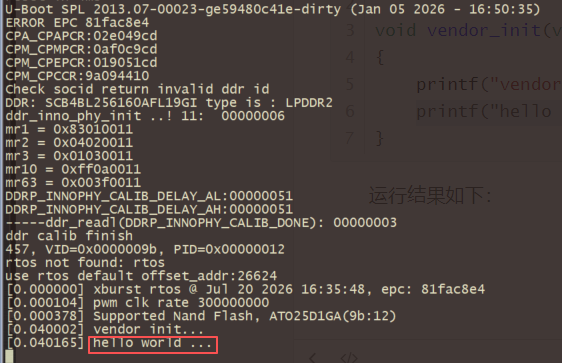
三 添加参与编译的源文件
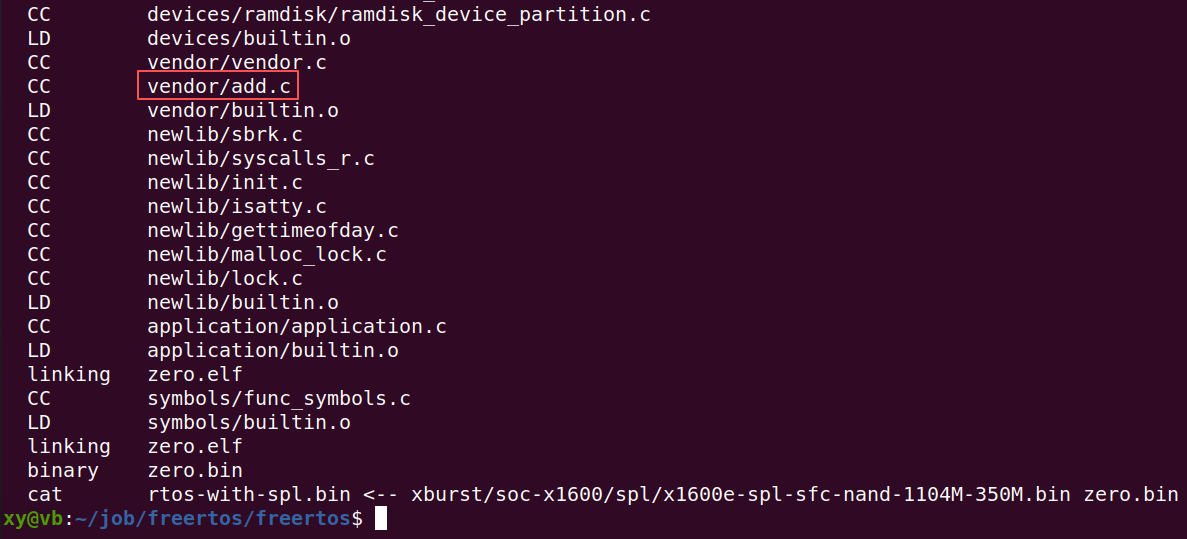
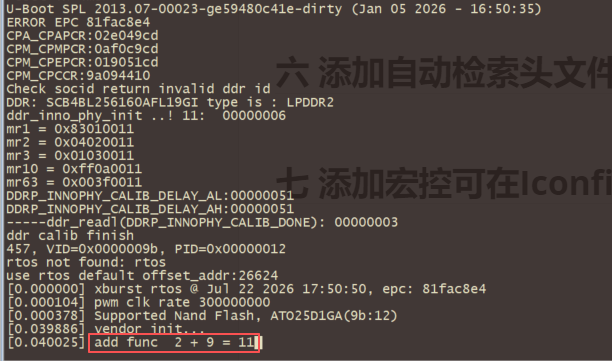
⽀持格式: .c .s .S .cc .cpp ,⽬前暂不⽀持C++ 添加文件:freertos/vendor/add.c
#include <stdio.h>

int add(int a, int b)
{
    int val = a + b;
    printf("add func %d + %d = %d", a, b, val);
    return val;
}
在 freertos/vendor/Makefile 中添加:
src-y += add.c
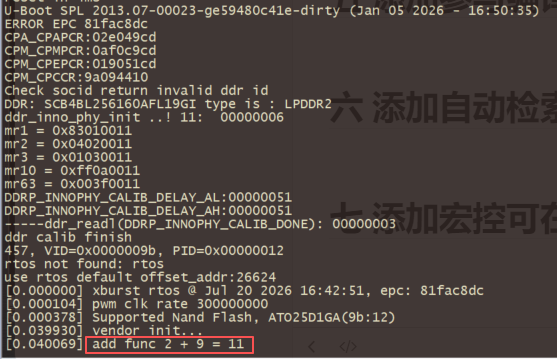
在freertos/vendor/vendor.c中调用如下:
#include <stdio.h>
extern int add(int a, int b);

void vendor_init(void *arg)
{
    printf("vendor init...\n");
    add(2,9);
}
加⼊后编译如下所⽰:
烧录后运行如下:
注意:如果简单的文件,也可以不在freertos/vendor/Makefile中添加,直接在freertos/vendor/vendor.c中如下引用也是可以的:
#include <stdio.h>
#include "vendor/add.c"     //引用对应的文件

void vendor_init(void *arg)
{
    printf("vendor init...\n");
    add(2,9);   // 调用其中的函数
}
四 在外部编译静态库文件
本节演示将add.c编译成静态库libmyadd.a的方法。
xy@vb:~/job/freertos$ touch add.c
xy@vb:~/job/freertos$ vim add.c
内容如下:
#include <stdio.h>

int myadd(int a, int b)
{
    int val = a + b;
    printf("add func  %d + %d = %d", a, b, val);
    return val;
}
创建头文件:
xy@vb:~/job/freertos$ cat myadd.h
内容如下:
int myadd(int a, int b);
编译方法如下:
/*首先确认编译工具链*/
xy@vb:~/job/freertos$ cat freertos/configs/x1600e_nand_defconfig |grep toolchain
RTOS_TOOLCHAIN_PATH=../tools/toolchains/mips-xburst1-newlib430/bin

/*编译目标文件*/
xy@vb:~/job/freertos$ ./tools/toolchains/mips-xburst1-newlib430/bin/mips-sde-elf-gcc -c -G 0 add.c
xy@vb:~/job/freertos$ ls
add.c  add.o  bootloader  doc  freertos  myadd.h  repack  test  tools  x-loader
特别注意:在编译时必须加上 -G 0 参数,否则制作成静态库后,可能使用会报错!


⽣成.a⽂件:
xy@vb:~/job/freertos$ ./tools/toolchains/mips-xburst1-newlib430/bin/mips-sde-elf-ar -rcs libmyadd.a add.o
xy@vb:~/job/freertos$ ls
add.c  add.o  bootloader  doc  freertos  libmyadd.a  myadd.h  repack  test  tools  x-loader
五 添加参与编译的目标文件
支持添加的目标文件格式:.o .a
本节演示将上述生成的libmyadd.a添加进入编译程序,并调用。
xy@vb:~/job/freertos$ cp libmyadd.a freertos/vendor/libmyadd.a
xy@vb:~/job/freertos$ cp myadd.h freertos/vendor/
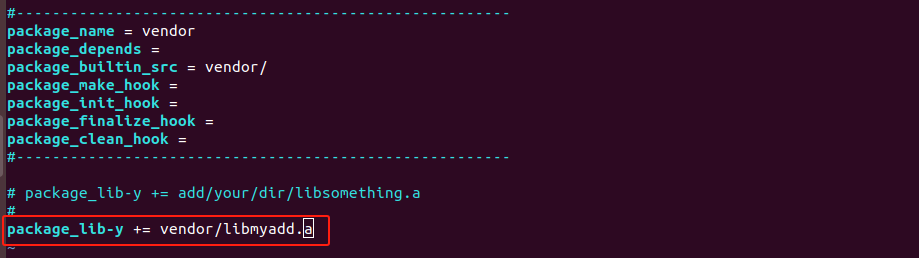
修改package/vendor/vendor.mk添加package_lib-y += vendor/libmyadd.a
在 vendor.c 引⽤ libmyadd.a 中的函数:
xy@vb:~/job/freertos/freertos$ vim vendor/vendor.c

烧录结果显示:
六 添加自动检索头文件目录
添加⾃动检索头⽂件⽬录:可以⽤ #include <xxx.h> 添加头⽂件,操作如下:
对⽬录 freertos/package/vendor 下的 vendor.mk ⽂件代码添加include头⽂件⽬录
CFLAGS += -Ivendor/include
七 添加宏控可在IconfigTool中修改
参考文档:freertos代码库\doc\FAE文档\添加IConfigTool配置选项.pdf
八 其他详细文档
详细开发文档:freertos代码库\doc\开发使用说明\3_FreeRTOS快速开发文档.pdf