signature命令行工具使用说明
一 概述
有些客户为了满足自动化生产的要求, 需要命令行的签名工具, 来减少人工的干预.本文使用命令行签名工具signature对以下文件进行加密签名:
烧录工具spl:firmwares\ad100\spl.bin
烧录工具uboot:firmwares\ad100\uboot.bin
系统文件spl :build\output\u-boot-spl-pad.bin
系统文件kernel :build\output\xImage
系统文件rootfs :build\output\rootfs.squashfs
二 命令行解释
bhu@bhu-PC:~/Desktop/ad111$ ./signature_20250717_fix_segmentation -help
./signature_20250717_fix_segmentation: invalid option -- 'h'
Usage: ./signature_20250717_fix_segmentation [-x][-p][-s][-n][-c chipname] [-m mode] [-k filepath] [-r rsafilepath] [-a aesfilepath] inputfile outputfile
-c chip: x1000 | x1600 | x2000 | x2600
-m mode: uboot_with_spl | burn_spl | burn_uboot | spl | kernel | rtos | other
-k filepath: public key for x1000 rsa. the key is generate by keygen.
-r rsafilepath: rsafile for x1600 | x2000 | x2600 option.
-a aesfilepath: aesfile for x1600 | x2000 | x2600 option.
-n don't aes encrypt for x1600 | x2000 | x2600 option.
-s don't rsa signatrue for x1600 | x2000 | x2600 option.
-p don't pad sha256 for x1600 | x2600 option.
-x chipkey re-encryption for x1600 | x2000 | x2600 option.
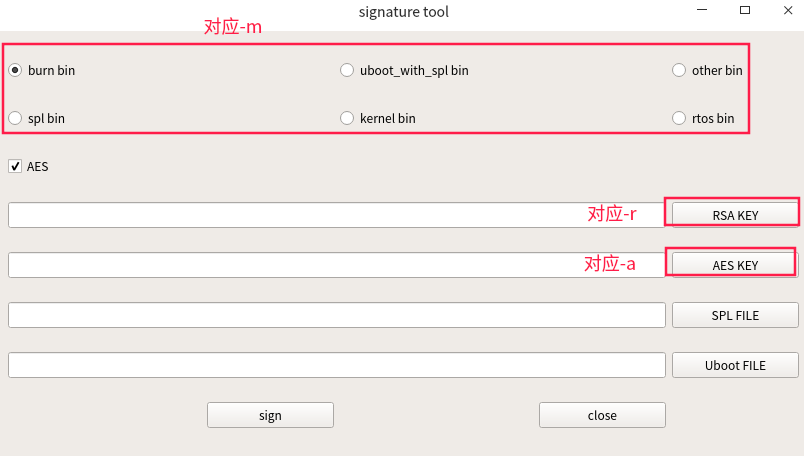
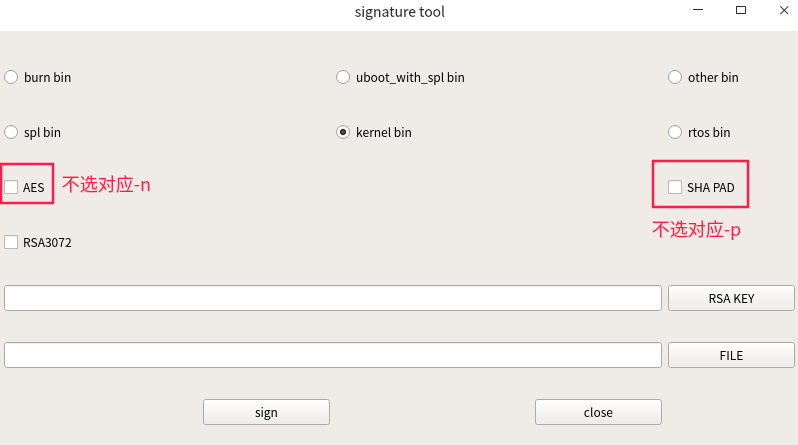
其中参数和图形界面工具的对应关系如下:
-c 对应芯片类型, ad10X用x2600
inputfile与outputfile 都必须填写绝对路径
三 签名
3.1 前置条件
- 有烧录工具
- 已经通过烧录工具目录securitytool/x2000/keytool下的keygen-64生成 key.bin, pri_key.pem , user_key.bin
- key.bin已替换security/x2000目录下的, pri_key.pem , user_key.bin已替换securitytool/x2000/sigtool/security_key目录下的
3.2 签名加密烧录工具spl
cloner-2.5.58.7-ubuntu_alpha/firmwares/ad100/spl.bin
bhu@bhu-PC:~/Desktop/ad111$ ./signature_20250717_fix_segmentation -c x2600 -m burn_spl  -r /home/bhu/Desktop/cloner-latest-ubuntu/cloner-2.5.58.7-ubuntu_alpha/securitytool/x2000/sigtool/security_key/pri_key.pem -a /home/bhu/Desktop/cloner-latest-ubuntu/cloner-2.5.58.7-ubuntu_alpha/securitytool/x2000/sigtool/security_key/user_key.bin  /home/bhu/Desktop/cloner-latest-ubuntu/cloner-2.5.58.7-ubuntu_alpha/firmwares/ad100/spl.bin home/bhu/Desktop/cloner-latest-ubuntu/cloner-2.5.58.7-ubuntu_alpha/firmwares/ad100/spl_sec.bin
#注意路径是绝对路径
3.3 签名加密烧录工具uboot
cloner-2.5.58.7-ubuntu_alpha/firmwares/ad100/uboot.bin
bhu@bhu-PC:~/Desktop/ad111$ ./signature_20250717_fix_segmentation -c x2600 -m burn_uboot  -r /home/bhu/Desktop/cloner-latest-ubuntu/cloner-2.5.58.7-ubuntu_alpha/securitytool/x2000/sigtool/security_key/pri_key.pem -a /home/bhu/Desktop/cloner-latest-ubuntu/cloner-2.5.58.7-ubuntu_alpha/securitytool/x2000/sigtool/security_key/user_key.bin  /home/bhu/Desktop/cloner-latest-ubuntu/cloner-2.5.58.7-ubuntu_alpha/firmwares/ad100/uboot.bin home/bhu/Desktop/cloner-latest-ubuntu/cloner-2.5.58.7-ubuntu_alpha/firmwares/ad100/uboot_sec.bin
#注意路径是绝对路径
3.4 签名加密系统文件spl
u-boot-spl-pad-dst.bin
./signature_20250717_fix_segmentation -c x2600 -m spl -r /home/bhu/Desktop/cloner-latest-ubuntu/cloner-2.5.58.7-ubuntu_alpha/securitytool/x2000/sigtool/security_key/pri_key.pem -a /home/bhu/Desktop/cloner-latest-ubuntu/cloner-2.5.58.7-ubuntu_alpha/securitytool/x2000/sigtool/security_key/user_key.bin  /home/bhu/Desktop/ad111/u-boot-spl-pad.bin /home/bhu/Desktop/ad111/u-boot-spl-pad-dst.bin
#注意路径是绝对路径
3.5 签名加密系统文件kernel
xImage
./signature_20250717_fix_segmentation -p -c x2600 -m kernel -r /home/bhu/Desktop/cloner-latest-ubuntu/cloner-2.5.58.7-ubuntu_alpha/securitytool/x2000/sigtool/security_key/pri_key.pem -a /home/bhu/Desktop/cloner-latest-ubuntu/cloner-2.5.58.7-ubuntu_alpha/securitytool/x2000/sigtool/security_key/user_key.bin  /home/bhu/Desktop/ad111/xImage /home/bhu/Desktop/ad111/xImage-dst.bin
#注意路径是绝对路径
#注意-p不勾选sha pad
3.6 签名系统文件rootfs
rootfs.squashfs
./signature_20250717_fix_segmentation -n -p -c x2600 -m kernel -r /home/bhu/Desktop/cloner-latest-ubuntu/cloner-2.5.58.7-ubuntu_alpha/securitytool/x2000/sigtool/security_key/pri_key.pem /home/bhu/Desktop/ad111/rootfs.squashfs /home/bhu/Desktop/ad111/\rootfs-dst.squashfs
#注意路径是绝对路径
#注意-n不勾选aes加密
#注意-p不勾选sha pad
四 生成烧录镜像文件
uboot:u-boot-spl-pad-dst.bin
kernel最终烧录文件xImage-dst_sig.bin的合成方法:
bhu@bhu-PC:~/Desktop/ad111$ dd if=rootfs-dst.squashfs of=signature bs=2048 count=1
bhu@bhu-PC:~/Desktop/ad111$ cat xImage-dst.bin signature > xImage-dst_sig.bin
kernel选择xImage-dst_sig.bin烧录
rootfs:rootfs.squashfs